Simplifying Customer Onboarding: How Scaleboard Makes It Effortless, Collaborative, and Transparent
Updated: Nov 3, 2025
When a new customer signs up, the real work begins — onboarding. It’s the make-or-break phase where teams either deliver a smooth, value-driven experience or get lost in the chaos of scattered communication, endless email threads, and lost documents.
At Scaleboard, we believe onboarding shouldn’t feel like project management gymnastics. It should be simple, transparent, and deeply collaborative. That’s why we’ve built a unified workspace designed to make onboarding not just efficient, but enjoyable — for both your team and your customer.
Let’s take a look at how Scaleboard transforms the customer onboarding experience.
One Workspace, All Your Content
Gone are the days of juggling Google Docs, PowerPoints, PDFs, and drive links across a dozen emails. With Scaleboard Workspaces, everything your customer needs — documents, decks, onboarding videos, checklists — lives in one place.
You can easily upload, organize, and share content directly with your customer. Whether it’s a kickoff presentation or a technical implementation guide, your customer can access everything seamlessly without having to hunt through old emails.
Think of it as a single source of truth for every onboarding deliverable.
Real-Time Collaboration, Right Where Work Happens
Most onboarding projects get stuck in the back-and-forth. Comments buried in emails. Feedback lost in chat threads. Scaleboard changes that.
Customers and internal teams can collaborate directly on documents and plans within the workspace. Need your customer’s feedback on a success plan? They can comment, suggest edits, or ask questions — all in real time.
No more context switching between Slack, email, and docs. Everything stays connected, conversational, and visible.

Keep Everyone Aligned — Meetings, Updates, and Decisions
Onboarding involves dozens of moving parts — kickoff calls, configuration reviews, weekly syncs, and milestone updates. With Scaleboard, all of it stays tracked in one shared timeline.
You can see upcoming meetings, meeting notes, and decisions made — all recorded automatically within the workspace. This means no missed context when someone new joins the project or when a stakeholder wants to know what’s been decided so far.
It’s accountability and clarity, built right in.
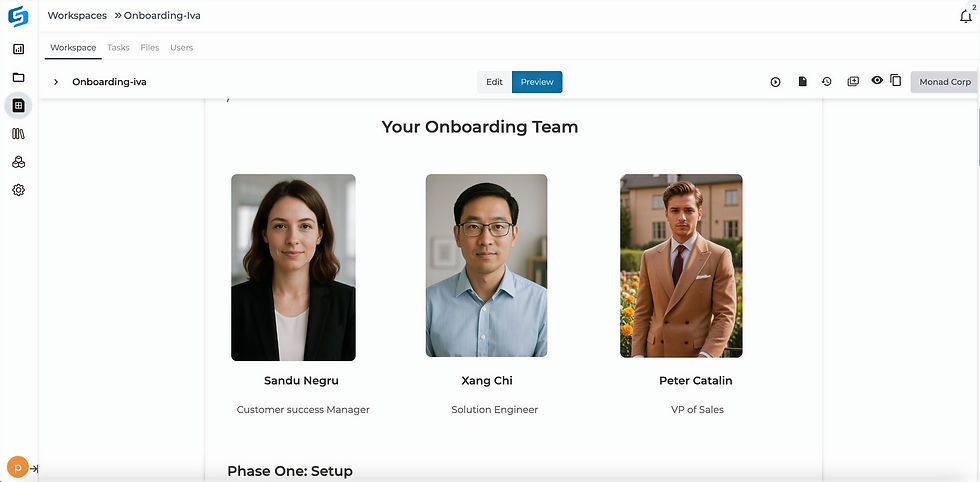
Transparency into Team Structure and Points of Contact
One of the first questions new customers ask: “Who should I reach out to for what?”
With Scaleboard, that confusion disappears. Each workspace clearly displays your team structure and points of contact — from the onboarding manager to the technical consultant to the CSM.
Your customer instantly knows who’s responsible for what, making communication faster and smoother. It’s a small touch that goes a long way in building trust.
Tasks, Meetings, Agendas — All in One Place
Assigning tasks shouldn’t require another tool. Within Scaleboard, you can create and assign tasks, set due dates, and even attach relevant documents or meeting notes.
Planning an onboarding sync? Add it right to the workspace — along with the agenda and related materials — so everyone comes prepared and aligned.
No more chasing updates or wondering what’s next. Everyone knows what to do, when, and why.

Bringing It All Together
Onboarding isn’t just about completing a checklist. It’s about setting the tone for a long, successful partnership.
With Scaleboard, you give your customers an experience that feels organized, transparent, and collaborative from day one. Instead of managing chaos, your teams can focus on what truly matters — delivering value and building relationships that last.
Because when your customers feel seen, guided, and confident — onboarding becomes more than a process. It becomes the beginning of growth.
Ready to see how effortless onboarding can be?👉 Explore Scaleboard Workspaces and start onboarding customers the modern way.

